Customise Locale Messages
Multiverse modules support customising the messages players see in-game via locale files. You can use this to override existing messages, rebrand command output, tweak wording to suit your server, or add a brand new language translation that doesn't exist yet.
Creating the locales folder
Inside your server's plugins/Multiverse-Core/ folder, create a folder named locales:
plugins/
└── Multiverse-Core/
└── locales/ ← create this folderGetting the original locale file
The English locale file is the base reference for all message keys. Download or copy it from the Multiverse-Core GitHub repository:
Place the file inside the locales folder you just created. The file name determines which locale it applies to, for example:
| File name | Locale |
|---|---|
multiverse-core_en.properties | English |
multiverse-core_es.properties | Spanish |
multiverse-core_zh.properties | Chinese |
multiverse-core_ru.properties | Russian |
For existing languages, you only need to include the keys you want to override. Multiverse will fall back to the built-in defaults for any key not present in your file.
To add a language that isn't available, create a new file using the appropriate ISO 639-1 language code (e.g. multiverse-core_fr.properties for French).
If you've created a new language file, consider opening a pull request on the Multiverse-Core GitHub repository so everyone else can benefit from your work!
Editing the locale file
Open the file in any text editor. Each line follows the format:
message.key=The message text hereColour codes use the & prefix (e.g. &a for green, &c for red). Placeholders wrapped in {curly braces} are filled in at runtime and should be kept as-is.
Example: changing the world list header
The default world list header is defined by:
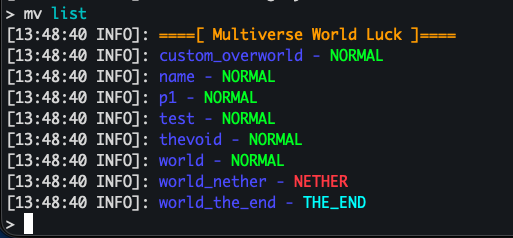
mv-core.list.header=&6====[ Multiverse World List ]====To change it to something else, add this line to your locales file with your preferred text:
mv-core.list.header=&6====[ Multiverse World Luck ]====After restarting (see below), the /mv list output will show your custom header instead of the default one.
Other Multiverse modules
The same process applies to these modules. Create the locales folder inside that module's plugin folder and use its matching file name.
| Module | Example path | Original locale file |
|---|---|---|
| Multiverse-Inventories | plugins/Multiverse-Inventories/locales/multiverse-inventories_en.properties | View source |
| Multiverse-NetherPortals | plugins/Multiverse-NetherPortals/locales/multiverse-netherportals_en.properties | View source |
| Multiverse-Portals | plugins/Multiverse-Portals/locales/multiverse-portals_en.properties | View source |
Multiverse-Portals also lets you select a locale key for an individual portal's success or permission-denied message. See Configure Portal Messages for examples.
ACF command messages
Multiverse uses Aikar's Command Framework (ACF) for command handling, and ACF has its own set of messages (such as invalid argument errors and permission-denied notices). These can also be overridden by placing a locale file from the ACF languages folder into your locales folder.
The file should follow the same naming convention (e.g. acf-core_en.properties). Check the ACF repository for the exact file names and available keys.
Applying your changes
Locale changes require a full server restart to take effect. /mv reload is not sufficient.